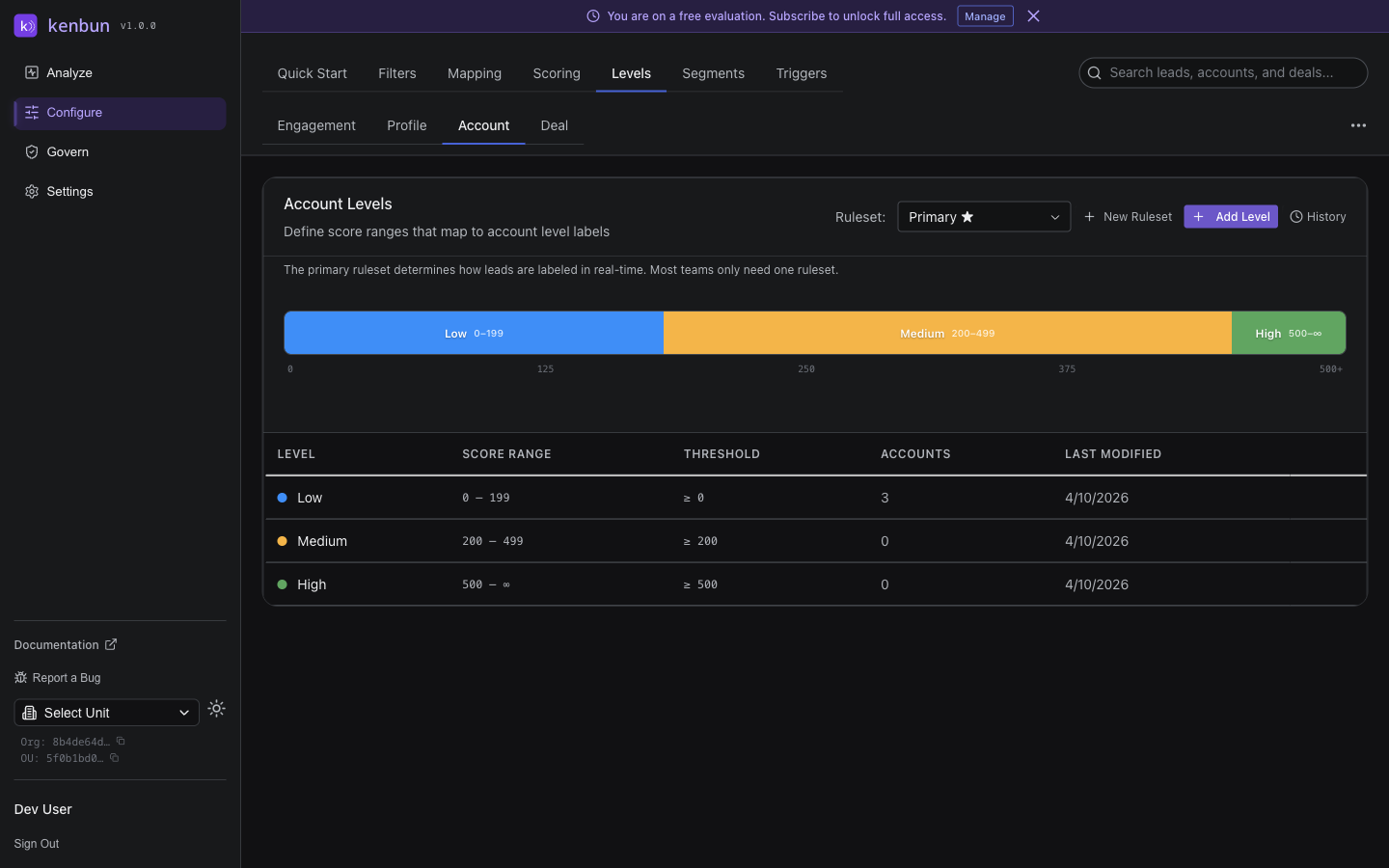
Account Levels
Account Levels bucket account-level scores into tiers like "Target," "Qualified," and "Standard." They answer the question: how should we prioritize this entire company, regardless of which individual contact is engaging?
Requires ABM. Account Levels appear in the navigation only when Account-Based Marketing is enabled. Turn it on under Settings > Scoring.
When To Use Account Levels
Lead-level scoring is great when you're dealing with self-serve buyers, but enterprise sales operates at the account level — multiple stakeholders, long cycles, big-ticket decisions. Account Levels give you a way to tier whole companies for:
- ABM campaign targeting and ad audiences.
- Sales territory planning and account assignment.
- Coordinated outreach where multiple SDRs and AEs work the same account.
- Customer-success prioritization once accounts convert.
For a deeper ABM strategy lens, see ABM Overview. This page focuses on configuring the levels themselves.
Example Configurations
Sales-Driven Tiers (Four-Tier)
| Name | Min | Max | Color | Sales Motion |
|---|---|---|---|---|
| Target | 80 | — | Purple | High-touch, personalized outreach, executive engagement |
| Qualified | 50 | 79 | Blue | Inside sales, nurture sequences, standard demos |
| Standard | 20 | 49 | Green | General marketing, self-service resources |
| Low Priority | 0 | 19 | Gray | Automated content only; monitor for changes |
Customer Lifecycle (Three-Tier)
| Name | Min | Max | Color |
|---|---|---|---|
| Strategic | 70 | — | Violet |
| Healthy | 30 | 69 | Blue |
| At Risk | 0 | 29 | Gray |
Customer Segmentation (Four-Tier)
| Name | Min | Max | Color |
|---|---|---|---|
| Enterprise | 90 | — | Purple |
| Growth | 60 | 89 | Blue |
| SMB | 30 | 59 | Green |
| Disqualified | 0 | 29 | Red |
Configuring Account Levels
- Navigate to Configure > Levels > Account.
- Click Add Level.
- Enter:
- Name — tier label (e.g., "Target")
- Min Score (inclusive)
- Max Score (inclusive, or leave blank for the top tier)
- Color (optional)
- Click Save.
History and Revert
Click History to see every snapshot of your account levels. Click Revert on any entry to restore that configuration. Reverting reclassifies all accounts immediately.
How Account Levels Update
Account levels recalculate when:
- Account metadata changes (e.g., a CRM sync updates
industryoremployees). - The primary Account Scoring Rules ruleset changes.
- Score range thresholds change.
Levels do not change in response to lead engagement — engagement is tracked separately at the lead level. Account-level activity is reflected in account scores only when you have account scoring rules configured for engagement-derived attributes.
Best Practices
Coordinate With Account Scoring
Levels and scoring rules need to agree. If your max possible account score is 150 (because of how your rules are weighted), don't create a level with a minimum of 160 — it'll be empty forever. Look at the actual score distribution before locking thresholds.
Aim for a Roughly Pyramid Distribution
For most B2B businesses:
- 10–20% in Target
- 30–40% in Qualified
- 30–40% in Standard
- 10–20% in Low Priority
If 80% of accounts pile into one tier, your scoring is too homogeneous or your ranges are too narrow. Adjust before triggers and segments start firing on the wrong accounts.
Color-Code Intuitively
| Color | Use For |
|---|---|
| Purple / Violet | Highest priority (Target) |
| Blue | High priority (Qualified) |
| Green | Medium priority (Standard) |
| Gray | Low priority (Unqualified) |
| Red | Disqualified or churned |
Avoid sending mixed signals — don't put red on your top tier or green on your lowest.
Review Distribution Quarterly
ICP changes over time. New segments emerge, others shrink. Revisit your account level distribution at least once a quarter to make sure the tiers still align with where you want sales focused.
Troubleshooting
Accounts Show No Level
- A level ruleset must be set as primary.
- The primary ruleset must be enabled.
- Score ranges must cover all possible scores, including 0.
- There must be no gaps between adjacent ranges.
All Accounts Land in One Tier
- Account scoring rules are too uniform — most accounts match the same set of rules.
- Score ranges are too wide.
- Adjust scoring weights to discriminate more, then retune ranges.
Levels Don't Update After Score Changes
- Wait a couple of minutes for recalculation.
- Confirm the primary ruleset is still enabled.
- Refresh the account page to see the latest data.
Account Levels Tab Is Missing
ABM isn't enabled. Go to Settings > Scoring and turn on Account-Based Marketing.