Engagement Levels
Engagement Levels bucket a lead's engagement score into named tiers like "Cold," "Warm," and "Hot." They answer the question: how actively is this lead engaging with us right now?
When To Use Engagement Levels
Engagement is the most common way teams prioritize daily outreach. A lead who just opened three emails, viewed your pricing page, and downloaded a whitepaper is engaging right now — and engagement levels surface that without anyone digging into the activity timeline.
Use engagement levels to:
- Sort the Leads table to your hottest prospects each morning.
- Trigger Slack alerts the moment a lead enters "Hot."
- Build re-engagement campaigns for leads who slip from "Hot" back to "Cold."
Example Configuration
A typical four-tier engagement model:
| Name | Range | Meaning |
|---|---|---|
| Cold | 0–24 | Minimal engagement; needs nurturing |
| Warm | 25–49 | Showing interest; ready for marketing follow-up |
| Hot | 50–74 | High engagement; sales-ready |
| Very Hot | 75+ | Extremely engaged; immediate outreach |
Some teams add a "Very Cold" tier covering 0 or negative scores when negative scoring is enabled, so every lead is classified.
Configuring Engagement Levels
- Navigate to Configure > Levels > Engagement.
- Click Add Level.
- Enter:
- Name — the tier label (e.g., "Hot")
- Min Score (inclusive)
- Max Score (inclusive, or leave blank for the top tier)
- Color (optional)
- Click Save.
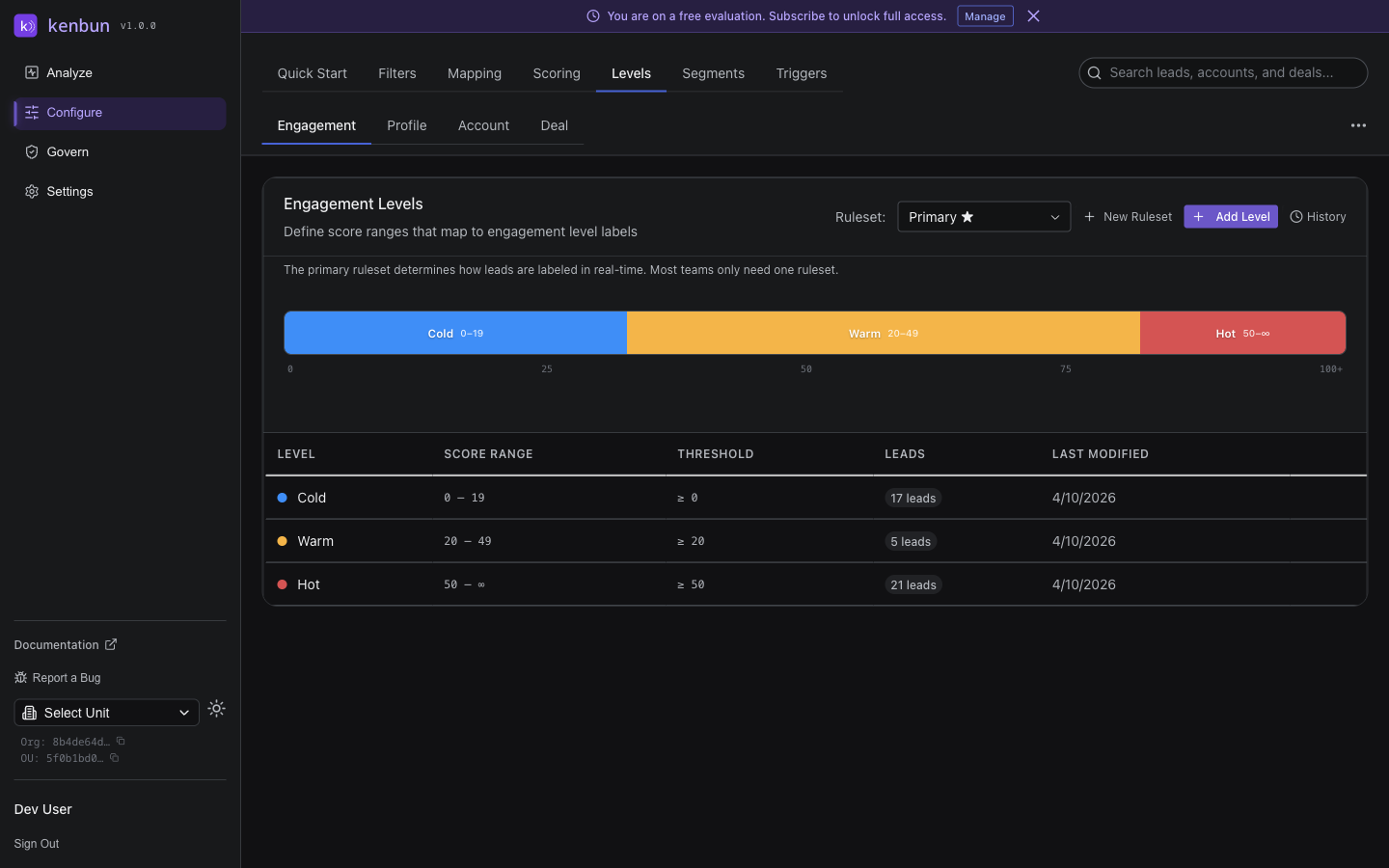
Repeat for each tier in your model. Ranges must not overlap and the top tier should be open-ended so very high scores still map cleanly.
History and Revert
Click History next to Add Level to see every change ever made to your engagement levels. Each entry shows who made the change and when, and the level table at that point in time. Click Revert on any entry to restore that snapshot — reclassification happens immediately.
Best Practices
Tie Each Level to a Sales Motion
A level isn't useful unless it changes what your team does. Map each tier to a clear action:
| Level | Sales Motion |
|---|---|
| Very Hot | Same-day SDR call, personalized outreach |
| Hot | 24-hour outreach window, demo invitation |
| Warm | Nurture sequence, gated content invite |
| Cold | Newsletter only; monitor for re-engagement |
Pair With Profile Levels
Engagement alone tells you who's interested, not who's a fit. Combine with Profile Levels to find the sharpest opportunities — leads that are both actively engaging and a strong ICP match.
Watch For Score Inflation
If everyone ends up "Hot" within a week, your scoring weights are probably too generous or you're missing a decay rule. Engagement levels work best when only the top 10–20% of leads sit in your top tier.
Troubleshooting
Engagement Levels Page Is Empty
You haven't created any levels yet. Click Add Level to start. If you used the Quick Start wizard, levels are typically pre-populated based on your industry choices.
A Lead Shows No Engagement Level
The lead's engagement score falls outside every defined range. Add a tier that covers the missing range — most often a "Very Cold" or "New" tier covering 0 (and any negative range if negative scoring is enabled).
Level Changes Aren't Reflected Immediately
Refresh the page. Reclassification happens in real time on the backend, but the cached view in your browser may not yet show the new badge.