Testing
Use this checklist to confirm your setup works end‑to‑end.
1) Send a Test Event
Use the API to send a single event with a known lead ID and event type you recognize (for example Page View).
curl -u "CLIENT_ID:CLIENT_SECRET" \
  -H "Content-Type: application/json" \
  -d '{"events":[{"lead_id":"test-123","event_type":"Page View"}]}' \
  https://your-api.example.com/ingest
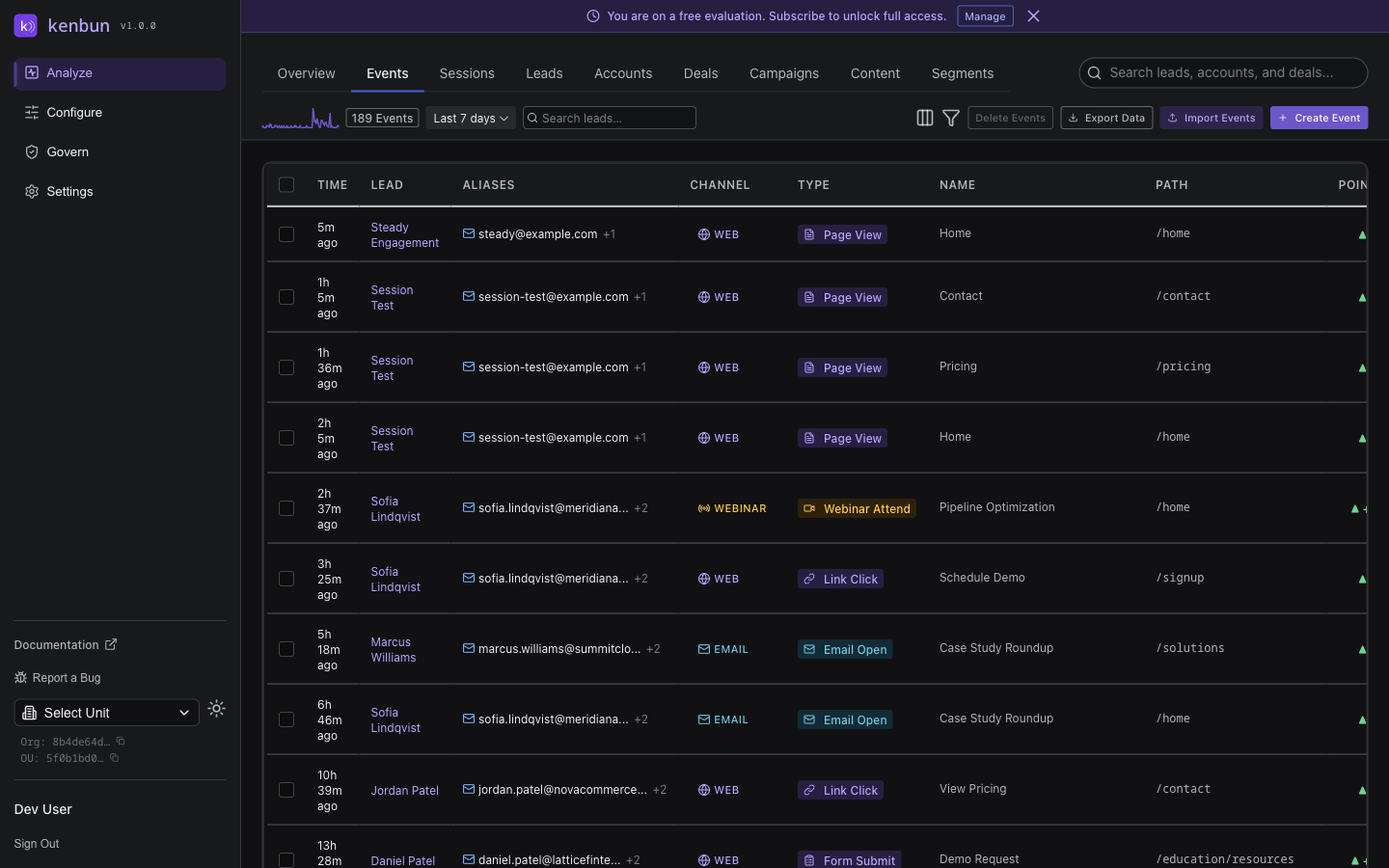
2) Verify the Event Appears
- Open the Events page
- Filter by the lead ID you used (e.g.,
test-123) - You should see the new event within a minute
3) Check the Lead’s Score
- Open the Leads page, search for the same lead ID
- If you created a scoring rule for
Page View, the score should increase
4) Test an Alert (Optional)
- Create a simple alert (for example, when a lead reaches 50 points)
- Send enough events to reach the threshold
- Confirm your alert is delivered (email, webhook, or in‑app)
5) Common Fixes
- Event not found: check the event type name and try again
- Score didn’t change: ensure your rule is active and matches the event type exactly
- Alert didn’t fire: verify the threshold and delivery settings
If something looks off, see Troubleshooting or contact Support from the Help menu.