Segments
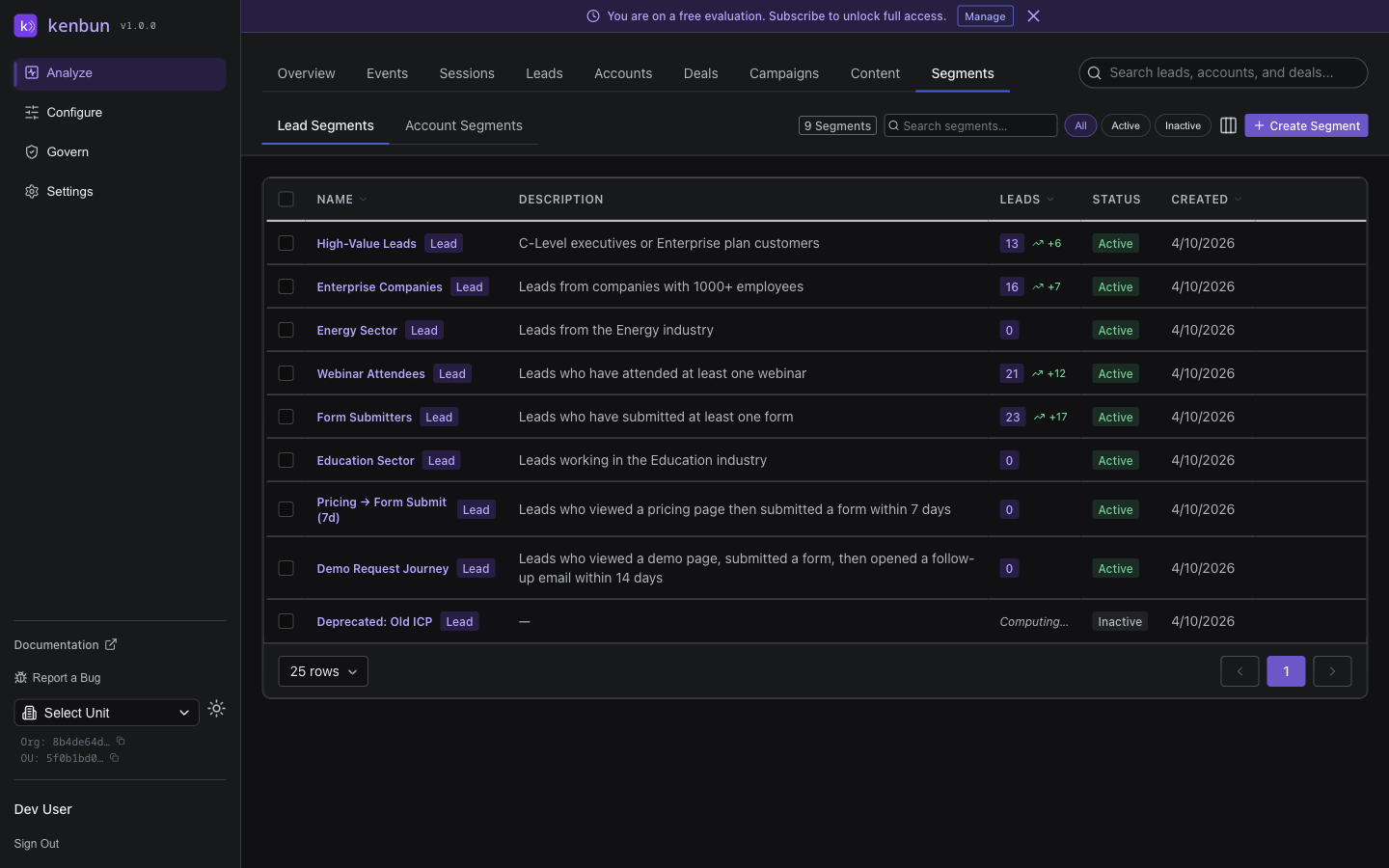
Segments automatically group leads based on shared characteristics or behaviors. Use segments to identify patterns, personalize outreach, and measure campaign effectiveness.
What Is a Segment?
A segment is a dynamic group of leads that match specific criteria. As leads engage and their scores change, they automatically move in and out of segments.
Example segments:
- Hot Leads: Engagement score ≥ 50
- Enterprise Prospects: Company size > 1,000 employees
- Trial Users: Performed "trial_signup" event
- Email Engaged: Opened email in last 7 days
- High-Intent Researchers: Viewed pricing page + case study + docs
Creating Segments
Build segments using filters and conditions:
Simple Segments (Single Condition)
Segment: "Hot Leads"
Condition: Engagement Score ≥ 50
Segment: "Recent Activity"
Condition: Last Activity within 7 days
Complex Segments (Multiple Conditions)
Segment: "High-Value Prospects"
Conditions:
  - Engagement Score ≥ 30
  - Company Size > 500
  - Industry = "Technology"
  - Viewed pricing page
Segment: "Stalled Trials"
Conditions:
  - Performed "trial_signup" event
  - Last Activity > 14 days ago
  - Did NOT perform "api_call" event
Behavior-Based Segments
Group leads by specific action sequences:
Segment: "Demo-Ready Leads"
Conditions:
  - Viewed pricing page
  - Downloaded whitepaper OR attended webinar
  - Engagement Score ≥ 40
Using Segments
1. Personalized Outreach
Scenario: Different messaging for different segments
- Hot Enterprise Leads: Direct sales outreach with case studies
- Warm SMB Leads: Automated email nurture with product tips
- Cold Leads: Educational content to build awareness
2. Campaign Measurement
Scenario: Track campaign impact
- Create segment: "Webinar Attendees"
- Measure average engagement score before webinar
- Measure average engagement score 7 days after webinar
- See if the webinar increased engagement
3. Lead Handoff Rules
Scenario: Route leads to the right team
- Segment "Enterprise Hot Leads" → Alert enterprise sales team
- Segment "SMB Trial Users" → Alert inside sales team
- Segment "Unqualified" → Continue marketing nurture
4. Re-Engagement Campaigns
Scenario: Win back cold leads
Segment: "Previously Hot, Now Cold"
Conditions:
  - Current Engagement Score < 20
  - Max Historical Score ≥ 50
  - Last Activity > 60 days
Send targeted re-engagement campaign to this segment.
Segment Analytics
For each segment, you can see:
- Member Count: How many leads match the criteria
- Average Score: Mean engagement score across segment members
- Score Trend: Is the segment getting hotter or colder?
- Top Events: Most common actions performed by segment members
- Conversion Rate: If integrated with CRM, % who became customers
Dynamic vs. Static Segments
Dynamic Segments (Default)
Membership updates automatically as leads change:
- Lead scores 51 points → Automatically enters "Hot Leads" segment
- Lead goes inactive for 30 days → Automatically exits "Recent Activity" segment
Static Segments (Manual Snapshot)
Lock segment membership at a point in time:
- Useful for campaign cohorts: "Q1 Webinar Attendees"
- Historical analysis: "Leads as of Jan 1, 2025"
Segment Membership History
kenbun automatically tracks when leads enter and exit each segment. This history lets you see the full lifecycle of a lead's segment membership without any manual effort.
From a lead's detail page, you can see:
- Which segments the lead currently belongs to
- When they first entered each segment
- When they exited a segment (if they no longer match its criteria)
- Which specific conditions caused the entry or exit (e.g., "Engagement Score crossed 50" or "Performed pricing_page_view event")
Why this matters:
- Understand lead progression: See how a lead moved from "Warm" to "Hot" to "Demo Ready" over time
- Spot regression: Identify leads that fell out of high-value segments and may need re-engagement
- Audit segment logic: Confirm that your segment rules are working as expected by reviewing real membership events
- Attribution: Connect segment membership changes to campaigns or outreach activity
API Access
Manage segments programmatically:
- GET /segments - List all segments (if available)
- POST /segments - Create new segment (if available)
- Query leads by segment to power custom workflows
Best Practices
1. Start Simple
Begin with basic score-based segments:
- Cold (0-24 points)
- Warm (25-49 points)
- Hot (50-74 points)
- Very Hot (75+ points)
2. Build Actionable Segments
Every segment should drive a specific action:
- Hot Leads → Sales calls this segment
- Trial Not Activated → Send activation tips
- High-Fit, Low-Engagement → Launch targeted campaign
3. Monitor Segment Size
- Too large (>50% of your leads) → Too broad, not useful
- Too small (<1% of your leads) → Too narrow, or rare behavior
Aim for segments with 5-20% of your leads.
4. Combine Engagement + Fit
Don't just segment by score—layer in profile attributes:
- Hot + Enterprise = Top priority for AEs
- Hot + SMB = Top priority for inside sales
- High-Fit + Low-Engagement = Marketing nurture opportunity
5. Review Regularly
Set calendar reminders to review segments monthly:
- Are segment definitions still relevant?
- Do segment sizes make sense?
- Are segments driving results?
Common Segment Ideas
By Engagement Level:
- Hot Leads (ready to buy)
- Warm Leads (evaluating)
- Cold Leads (awareness stage)
By Behavior:
- Pricing Page Viewers
- Trial Users
- Email Engagers
- Event Attendees
- Multi-Touch Leads (engaged through multiple channels)
By Lifecycle Stage:
- New Leads (first seen < 30 days ago)
- Active Leads (engaged in last 7 days)
- Dormant Leads (no activity in 90+ days)
By Fit:
- Enterprise Prospects (1,000+ employees)
- SMB Prospects (1-500 employees)
- Target Industry (e.g., "Technology" or "Healthcare")
- Target Role (e.g., "VP of Marketing" or "Sales Director")
By Campaign:
- Q1 Campaign Responders
- Webinar Registrants
- Whitepaper Downloaders
- Demo Requesters
Related Pages
- Leads → - View individual lead profiles
- Events → - See the actions that drive segment membership
- Accounts → - See account-level engagement
- Configure → - Set up scoring rules that power segments
- Triggers → - Automate actions when leads enter segments