Sequences
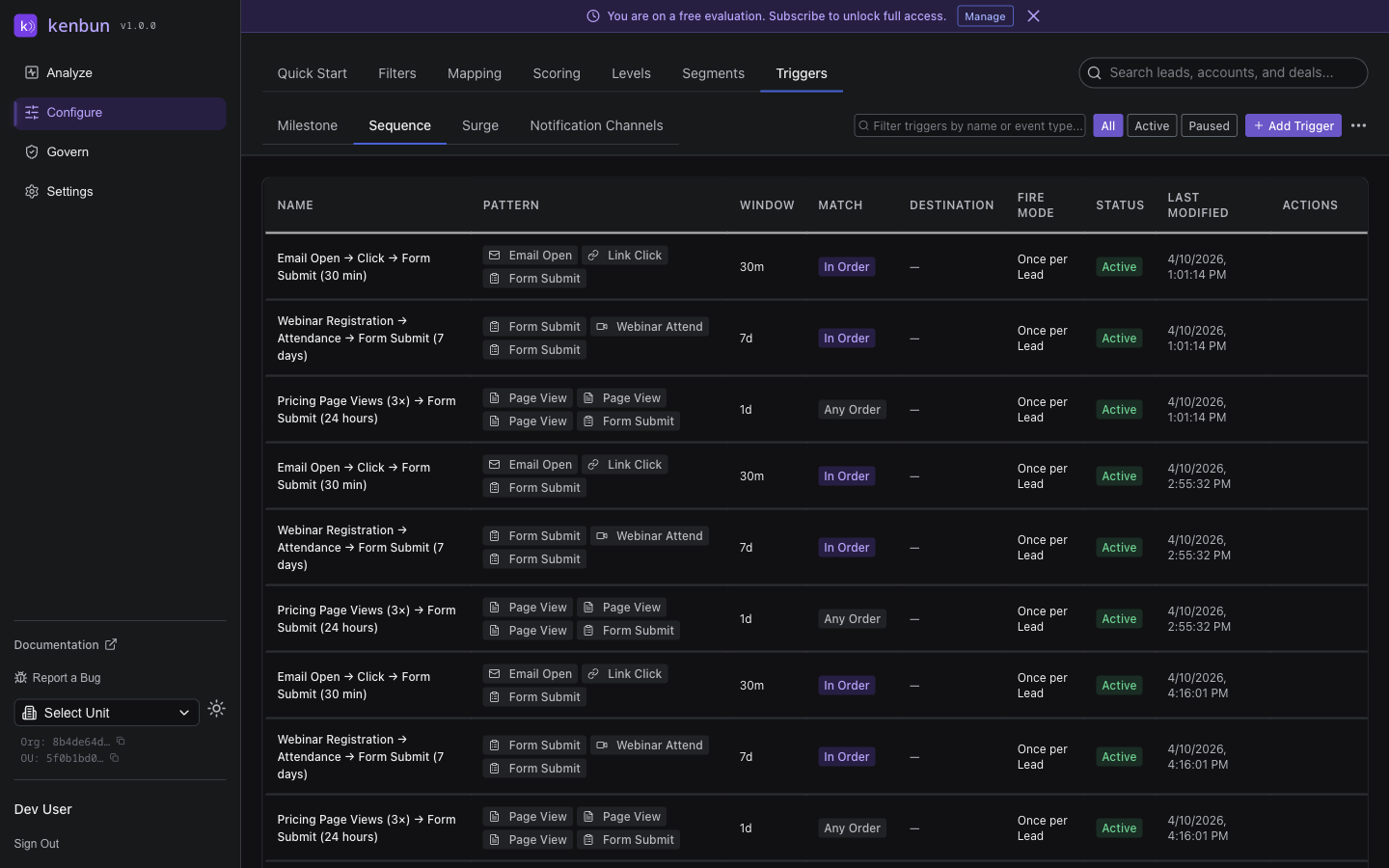
Sequences in kenbun allow you to define and track specific patterns of lead behavior, enabling sophisticated automation workflows and deeper insights into lead engagement. Unlike simple event-based triggers, sequences monitor for ordered combinations of actions that indicate meaningful progress through your sales funnel.
Understanding Sequences
A sequence is a defined pattern of events that must occur in a specific order (or within specified parameters) to trigger an action. Sequences are particularly powerful for identifying leads who demonstrate genuine interest through their behavioral patterns.
Purpose of Sequences
Sequences serve several important business functions:
Behavioral Pattern Recognition
- Identify leads who follow expected engagement paths
- Detect deviations from normal behavior patterns
- Recognize complex buying signals that simple events might miss
Sales Process Automation
- Automate notifications when leads reach key milestones
- Trigger specific follow-up actions based on behavioral sequences
- Create sophisticated escalation paths for different engagement patterns
Lead Qualification Enhancement
- Combine multiple data points for more accurate qualification
- Reduce false positives from single-event triggers
- Provide richer context for lead scoring and prioritization
Creating Sequences
Basic Sequence Setup
The Sequences page features an intuitive drag-and-drop builder interface:
- Open Configure and go to Sequences
- The interface displays three main panels:
- Event Library: Available event types you can drag into your sequence
- Pattern Builder: Where you construct your sequence by dragging events
- JSON Preview: Real-time preview of the sequence configuration
- Drag event types from the Event Library into the Pattern Builder to create your sequence
- Configure sequence parameters:
- Time Window: How long leads have to complete the sequence (in hours)
- Order Required: Toggle whether events must occur in exact order
- Destination: Choose how to receive notifications (Slack, Webhook, or Email)
- Click Save Pattern when finished
Adding Custom Events
If an event type isn't in the library:
- Use the Add Custom Event field at the bottom of the Event Library
- Enter the event type name and click Add
- The custom event appears in the library and can be dragged like any other event
Sequence Configuration Options
Each sequence can be configured with several detailed parameters:
Event Type Sequences
- Define specific lists of event types that must occur
- Set requirements for order-dependent or flexible ordering
- Specify minimum or exact matching requirements
Time Window Settings
- Define how long leads have to complete the sequence
- Set intervals between events for timing-based triggers
- Implement rolling windows for ongoing monitoring
Ordering Requirements
- Strict ordering: Events must occur in exact sequence
- Flexible ordering: Events can occur in any order within window
- Partial matching: Allow for incomplete sequence completion
Notification Options
- Slack notifications (if Slack integration is enabled for your organizational unit)
- Select a specific channel to receive sequence alerts
- Optionally mention specific Slack users in the notification
- Rich formatted messages with sequence details and lead information
- Email notifications with customizable subject, preheader, and message
- Webhook endpoints for integration with external systems
- CRM task creation through API integrations
Example Implementations
Standard Engagement Sequence
Setup in UI:
- Drag "Signup", "Email Open", and "Webinar Attendance" events into the Pattern Builder
- Set Time Window to 168 hours (7 days)
- Enable "Order Required" toggle
- Configure Slack notification to #sales channel or webhook to your CRM
- Save the pattern
Sequence: Signup → Email Open → Webinar Attendance
Time Window: 7 days (168 hours)
Ordering: Strict
Actions:
- Send notification to sales team via Slack
- Update lead status via webhook
- Add to follow-up nurturing campaign
Product Evaluation Sequence
Sequence: Trial Start → Feature A Usage → Feature B Usage → API Call
Time Window: 30 days
Ordering: Flexible (within window)
Actions:
- Assign to senior sales representative
- Schedule product demonstration
- Send premium content package
Sales Readiness Sequence
Sequence: Form Submission → Pricing Page View → Case Study Download
Time Window: 14 days
Ordering: Flexible
Actions:
- Flag for immediate sales follow-up
- Send personalized email from sales manager
- Add to high-priority lead list
Churn Prevention Sequence
Sequence: Regular Usage → Drop in Activity → Support Ticket
Time Window: 30 days
Ordering: Strict
Actions:
- Alert customer success team
- Schedule retention call
- Send special offer or incentive
Sequence Payload Structure
When a sequence trigger fires, receivers get a structured JSON payload containing detailed information about the matching events:
{
  "lead_id": "lead-12345",
  "sequence": ["Signup", "Email Open", "Webinar Attend"],
  "events": [
    {
      "id": "event-001",
      "event_type": "Signup",
      "timestamp": "2025-08-01T10:00:00Z",
      "metadata": {
        "source": "landing_page",
        "campaign": "summer_promotion"
      }
    },
    {
      "id": "event-002",
      "event_type": "Email Open",
      "timestamp": "2025-08-02T14:30:00Z",
      "metadata": {
        "email_id": "welcome_series_1",
        "subject": "Welcome to Our Platform"
      }
    },
    {
      "id": "event-003",
      "event_type": "Webinar Attend",
      "timestamp": "2025-08-05T15:00:00Z",
      "metadata": {
        "webinar_id": "product_overview_aug2025",
        "duration": 3600
      }
    }
  ],
  "matched_at": "2025-08-05T15:00:00Z"
}
This payload structure allows external systems to access complete context about why the sequence triggered, enabling more personalized responses.
Best Practices
Sequence Design Strategy
Develop effective sequences with these principles:
Business Alignment
- Design sequences that match your actual sales process
- Focus on behaviors that historically correlate with conversions
- Align sequence timing with your typical sales cycle length
- Ensure sequences reflect genuine buying intent rather than accidental actions
Appropriate Complexity
- Start with simple 2-3 event sequences before attempting complex patterns
- Balance sequence specificity with the frequency of occurrence
- Test sequences with historical data before full deployment
- Document the business rationale for each sequence
Error Prevention
- Avoid sequences that might trigger too frequently
- Implement safeguards against false positive matches
- Consider edge cases and exception handling
- Plan for scenarios where sequences partially match
Testing and Validation
You can test any sequence trigger directly from the UI before activating it. Click the play icon next to a sequence trigger, search for a lead by email or Lead ID, and click Run Test to see whether the sequence would fire. See Testing Your Triggers for step-by-step instructions.
For broader validation, establish robust testing processes:
Historical Data Validation
- Test sequences against known conversion patterns
- Validate timing assumptions with actual behavioral data
- Check for conflicts with existing sequences
- Verify payload structures meet integration needs
Gradual Rollout
- Deploy sequences to subsets of leads first
- Monitor trigger rates and false positive occurrences
- Gather feedback from sales and marketing teams
- Adjust parameters based on real-world performance
Advanced Configuration
Multi-Condition Sequences
Create sophisticated triggering conditions:
Conditional Logic
- AND conditions requiring multiple sequences
- OR conditions allowing alternative paths
- Nested conditions for complex business logic
- Time-based conditions with specific intervals
Weighted Scoring
- Assign different weights to sequence elements
- Implement threshold-based activation
- Create progressive sequences with escalating triggers
- Develop scoring systems that combine multiple sequences
Integration Patterns
Connect sequences with external systems effectively:
CRM Integration
- Create tasks and activities based on sequence triggers
- Update lead status and lifecycle automatically
- Assign leads to appropriate sales representatives
- Log sequence completion in customer records
Marketing Automation
- Trigger email campaigns based on sequence completion
- Update lead nurturing paths dynamically
- Adjust content recommendations based on sequences
- Modify scoring rules in response to sequence triggers
Analytics and Reporting
- Track sequence completion rates over time
- Analyze conversion rates for different sequences
- Monitor sequence effectiveness across lead segments
- Create dashboards showing sequence-based insights
Troubleshooting
Common Sequence Issues
Resolve typical problems with sequences:
Sequences Not Triggering
- Verify event type names match exactly
- Check that time windows are appropriately set
- Confirm ordering requirements are correctly configured
- Ensure lead events are being properly tracked in the system
False Positive Triggers
- Review event matching criteria for specificity
- Adjust time windows to reduce accidental matches
- Implement additional validation requirements
- Add metadata filters to improve accuracy
Performance Concerns
- Simplify complex sequence conditions where possible
- Reduce number of concurrently active sequences
- Optimize time window lengths for efficiency
- Archive sequences that are no longer needed
Debugging Sequence Problems
Systematically diagnose sequence issues:
-
Check Event Data
- Verify that required events are being recorded
- Confirm event type spelling and formatting
- Validate timestamp accuracy and timezone handling
-
Review Configuration
- Examine time window settings and ordering requirements
- Check activation status and scheduling parameters
- Verify notification endpoints and integration settings
-
Analyze Historical Matches
- Review previous sequence triggers for patterns
- Compare successful vs. unsuccessful sequence attempts
- Identify common factors in false positives or negatives
Monitoring and Optimization
Sequence Performance Metrics
Track key indicators of sequence effectiveness:
Trigger Rate Analysis
- Monitor how frequently each sequence triggers
- Identify sequences that trigger too often or too rarely
- Compare trigger rates across different lead segments
- Track changes in trigger rates over time
Conversion Correlation
- Measure conversion rates for leads who complete sequences
- Analyze time-to-conversion after sequence completion
- Compare sequence-triggered conversions with other lead sources
- Identify sequences with the strongest business impact
Sales Team Feedback
- Gather qualitative feedback from sales representatives
- Document successful outcomes from sequence-triggered actions
- Track follow-up effectiveness and lead quality reports
- Monitor changes in sales team satisfaction with lead quality
By effectively implementing sequences, you can create a sophisticated lead engagement system that recognizes complex behavioral patterns and automatically responds with personalized, timely actions that drive better outcomes.